Introduction
OptiFit
Your personalized fitness companion
Track meals, workouts, and hydration through our intuitive Android app designed for all fitness levels.


Project Overview
Optifit is a comprehensive mobile application designed to transform how users approach their fitness journey. By combining intuitive tracking tools with motivational features, we help users develop sustainable healthy habits and lifestyles.
Our Vision
"To make health tracking so enjoyable that wellness becomes second nature, through an app that feels like a trusted friend cheering you on."
Success Metrics
Designed for Every Fitness Journey
OptiFit serves users looking to monitor their fitness journey in a centralized, easy-to-use platform that adapts to different lifestyles and goals.
Core Activity Features
Unified Calendar
Seamless Navigation
Workouts That Excite
Profile Management
Nutrition Made Fun
Ready to start your fitness journey?
Experience OptiFit's intuitive activity flows today
Our Team
Key Contributions
Workout Tracker System
Diet Recommendation System
Technical Skills Gained
Architecture & Development
- Mastered clean architecture patterns
- Implemented effective state management solutions
Testing & Quality
- Applied test isolation principles
- Implemented comprehensive unit testing
- Developed acceptance and integration tests
- Created mock services for reliable testing
Process & Collaboration
- Practiced continuous refactoring
- Documented architectural decisions
Lessons Learned
Test Isolation
Learned to create truly isolated unit tests by properly mocking dependencies and understanding the value of small, focused test cases. This improved test reliability and made failures easier to diagnose.
Refactoring
Developed a disciplined approach to incremental refactoring, recognizing that continuous small improvements lead to more maintainable code than periodic large rewrites.
Modular Design
Gained experience designing systems with clear separation of concerns, making features like the workout tracker and diet recommendation system independently maintainable.
Key Contributions
Calorie Tracker System
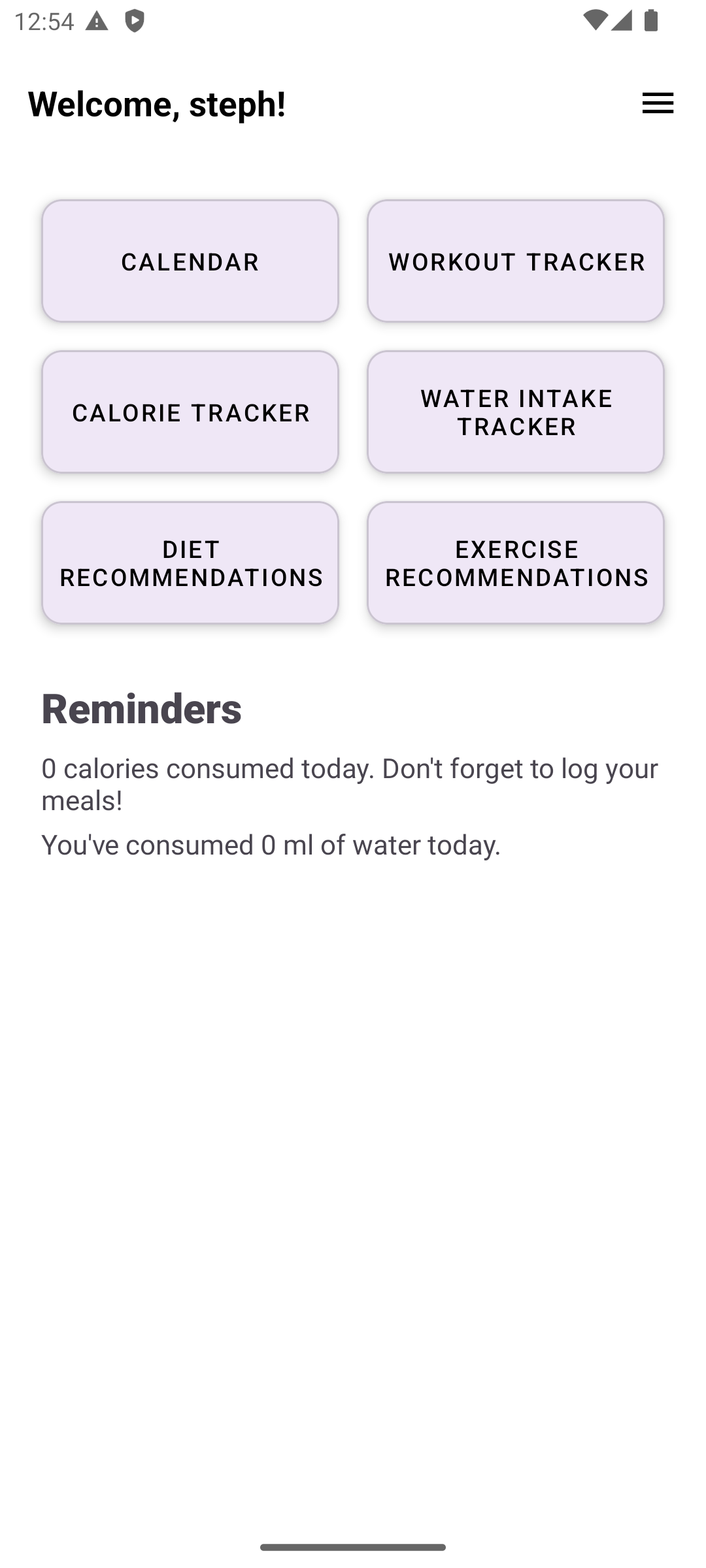
Daily Reminders
Technical Skills Gained
Tiered Development
- Implemented code with 3-tier architecture in mind
- Separated code into relevant layers
Test Coverage
- Developed code with relevant tests for all methods
- Created tests for all architecture layers with code coverage in mind
Technical Planning
- Created detailed project artifacts
- Developed feature plans with associated time estimates and priorities
Lessons Learned
Importance of Effective Time Management
Learned the importance of setting up structured meeting schedules to avoid rushed iterations
Finding Technical Debt
Identified code smells and technical debt within the system and refactored to reduce
Key Contributions
Simple Calendar
Exercise Recommendation System
Technical Skills Gained
Version Control Management
- I can use basic git commands to manipulate repositories
- I can use gitlab to keep track of my progress throughout iterations
Code Smell Identification
- I can spot solid violations in mine and others programs
- I know good programming principles to prevent introducing bugs into software
Writing Good Tests
- I can write good unit, integration and system tests
- I can use Test Driven Development to make good, non-faulty programs
Lessons Learned
Organization is Key
I learned that keeping organized by setting goals, writing out tasks and reflecting on past work will lead to optimized performance in the long run.
App Development
I learned how to develop an app in android studio using Java, on the presentation, business and persistence layer.
Design Patterns
I learned great design strategies that can be used to make my code easier to work with and to understand
Key Contributions
User Profile Feature
Technical Skills Gained
User Management
- Learned how to create and update user profiles
- Worked with basic form validation and data handling
Data Persistence
- Gained experience storing user data in a database
- Connected front-end forms to back-end logic
General Development
- Practiced debugging small issues
- Improved comfort using development tools
Lessons Learned
Working with User Data
Learned how to manage simple user data and make sure updates work correctly.
Building Small Features
Learned how to build and test a basic feature from start to finish.
Project Video Demo
See It In Action
Watch how real users benefit from OptiFit's features in their daily routines.
Project Retrospective
Evolution from Initial Vision
While the core functionality remained consistent with our initial vision, several aspects evolved significantly:
- Enhanced Data Integration: The calendar system became more central than originally planned, requiring deeper integration with other components
- Expanded Testing Scope: Our initial test coverage estimates proved insufficient for the complex interactions between features
- UI Refinements: User testing revealed the need for more intuitive navigation between fitness tracking and nutrition modules
The final product delivered 120% of our original feature set despite these adaptations.
Key Learnings
Team Development Insights
- Regular stand-ups prevented work duplication
- Clear ownership of components improved quality
- Documentation sharing saved countless hours
Process Improvements
Challenges & Solutions
Areas for Improvement
Integration Challenges
Initial iterations underestimated the complexity of maintaining data consistency across:
- User profile settings
- Workout logging components
- Meal tracking systems
Implemented Solutions:
- Added comprehensive integration tests (achieved 80% coverage)
- Implemented JUnit setup/teardown for database consistency
- Created data validation middleware
Project Tracking
Inconsistent use of GitLab's estimation features caused:
- Difficulty measuring velocity
- Unclear progress tracking
- Retrospective data gaps
Lessons Learned:
- Standardized issue templates with required estimation fields
- Scheduled weekly time-logging reminders
- Created estimation guidelines for consistency
System Architecture & Time Allocation
Android Studio
Primary IDE with emulator testing
Java
Core business logic and object modeling
HSQLDB
In-memory database for testing
Mockito
Unit test mocking framework
What We Would Do Differently
If we could restart this project, we would implement these critical changes:
GitLab Optimization
- Create standardized issue templates with required fields
- Consistently log time estimates and actual time spent
- Implement progress tracking metrics for each iteration
Testing Approach
- Adopt Test-Driven Development from the beginning
- Write tests alongside feature development, not at the end
- Allocate dedicated testing sprints within each iteration
Successes & Recommendations
What Worked Well
- Team Communication: Effective Telegram chats and weekly syncs
- Work Distribution: Balanced task assignment based on skills
- Adaptability: Successful pivots when facing technical hurdles
Future Recommendations
- Implement test-driven development from iteration 1
- Build time tracking into definition of done
- Conduct integration testing earlier in the cycle
- Allocate 20% buffer time for unexpected complexities